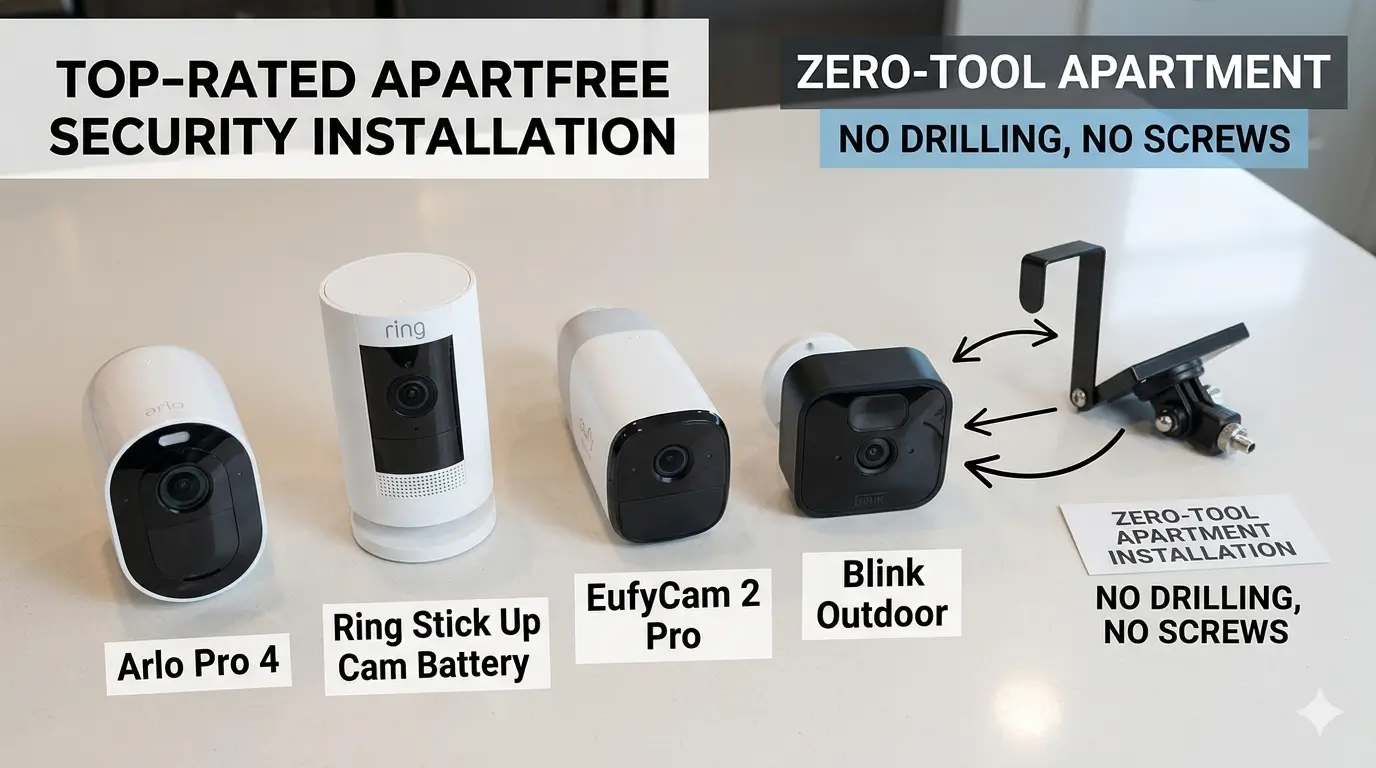
We are Reader-supported: We earn commissions through links at no extra cost to you. Details.
No-Drill DIY Home Security Cameras
Let’s be honest: traditional home security installation is a massive pain. It usually involves breaking out a heavy power drill, routing messy cables through your drywall, and praying you don’t accidentally strike a live electrical wire or a plumbing pipe.
If you are renting an apartment or a townhouse in the US, that little DIY project is also the fastest way to kiss your security deposit goodbye. Even if you own your home, who wants to spend a beautiful Saturday afternoon patching drywall, climbing unstable ladders, and wrestling with a toolbox?
Fortunately, smart home technology has evolved. You no longer need to make permanent structural holes to keep an eye on your property or protect your front porch from package thieves. Today’s top wire-free security systems offer crystal-clear video, instant phone alerts, and rugged weather resistance—and they can be fully installed in under 30 minutes without a single screw.
Let’s break down the absolute best no-drill DIY security cameras on the market, why they work for toolless setups, and how to pick the perfect system for your home.
1. Why “No-Drill” is the Smartest Choice for US Homes
Opting for a zero-tool security setup isn’t just about laziness—it’s a highly strategic move for the modern resident:
- Landlord & HOA Approved: Avoiding structural changes keeps your property manager or strict Homeowners Association (HOA) completely off your back.
- Move-Out Portability: When your lease ends or you pack up to relocate, your security system unclips and travels right with you. No patching, no painting, no penalty fees.
- Massive Cost Savings: Professional smart home installation services in the US easily run anywhere from $150 to $300+. Going the DIY route eliminates labor fees entirely.
- Defeating “Porch Pirates”: With package delivery at an all-time high, having an easily mountable visual deterrent directly at eye-level on your front door is the single best defense against opportunistic theft.
2. The Contenders: Best No-Drill Cameras Compared
To pull off a successful zero-tool installation, a camera needs to be either incredibly lightweight (so heavy-duty adhesives can hold it up safely) or natively compatible with specialized magnetic and clamp mounts.
The following options are highly reliable, easily accessible, and perfect for quick setups.
| Camera Model | Top Perk | Power Source | Video Resolution | Subscription Rule |
| Blink Outdoor 4 | 2-Year Battery Life | AA Lithium Batteries | 1080p HD | Optional (Cloud Needed for AI Features) |
| Wyze Cam v4 | Strong Magnetic Base | Wired (6ft Flat Cable) | 2.5K QHD | Optional (Free Local microSD Slot) |
| Google Nest Cam | Elite Free AI Alerts | Rechargeable Battery | 1080p HDR | Optional (Free 3-Hour Event History) |
| Eufy SoloCam S340 | Integrated Solar / No Fees | Solar + Battery | 3K Dual-Lens | No Subscription Ever(Internal Storage) |
Blink Outdoor 4 — The Best Overall Value
If your biggest worry is having to constantly climb up and take your cameras down to recharge them, the Blink Outdoor 4 is a fantastic choice. Weighing in at just 5 ounces, this camera is a complete featherweight. Because it is completely wire-free and runs on two AA lithium batteries, you can safely stick it onto a smooth outdoor surface using 3M Command strips or a vinyl siding clip without worrying about gravity pulling it down.
- The Catch: Video resolution tops out at 1080p HD. While it’s plenty clear to see everyday events, it won’t give you ultra-crisp digital zooming like higher-resolution competitors.

- Our second-generation Video Doorbell and fourth-generation Outdoor 4 cameras offer up to two years of battery life and i…
- Last longer with two-year battery life — Experience up to two years of smart security coverage on both devices with incl…
- See and speak from the Blink app — Experience head-to-toe HD viewing from Video Doorbell and 1080p HD live view from Out…
$104.99
Wyze Cam v4 — The Ultimate Budget Champion
Wyze has built a massive following by offering premium smart home features at a fraction of the cost of legacy brands. The Wyze Cam v4 features a incredibly strong built-in magnetic base right out of the box. If you have a metal door frame, a steel gutter bracket, or metal window trim, you can literally snap this camera into place in two seconds flat. It also ships with a metal mounting plate backed by strong adhesive for non-magnetic walls.
- The Catch: It is a wired camera. While the camera itself mounts without screws, you will need to route its 6-foot flat power cable to a nearby indoor or outdoor outlet.
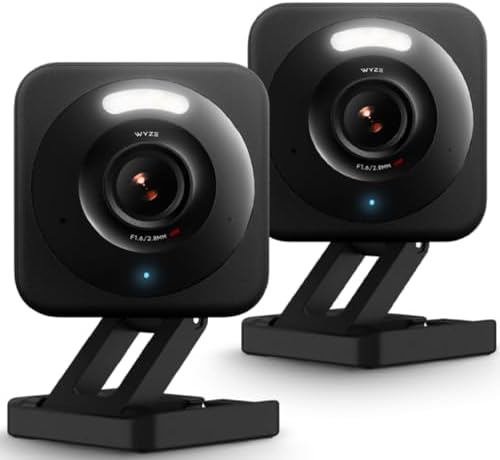
- 2.5K QHD Resolution – Elevate your monitoring with our security cameras featuring Quad High-Definition clarity, capturin…
- Indoor/Outdoor Versatility – Engineered for durability with IP65 weather resistance, Wyze Cam v4 is an ideal security ca…
- Enhanced Color Night Vision – Whether it’s night or day, see everything in vivid color and clarity with this indoor came…
$48.95
Google Nest Cam (Battery) — The Smart Premium Pick
For those completely embedded in the Google Home ecosystem, the Nest Cam (Battery) offers high-end design and intelligence. Google designed this with a remarkably strong, heavy-duty magnetic mount. You adhere the base to a surface, and the smooth, pebble-shaped camera snaps into the magnetic cup. It makes adjusting your camera angle seamless. Best of all, its on-device AI processes free Person, Vehicle, and Animal alerts without forcing you into a monthly fee.
- The Catch: It’s relatively heavy due to its internal rechargeable battery. If you use adhesives to mount the base, you must use industrial-grade, outdoor-rated mounting tape and let it cure fully before snapping the camera on.

- Meet the smarter, sharper wired Google Nest Cam Indoor; with 2K HDR video and Gemini, it knows what to look out for and …
- With an Advanced subscription to Google Home Premium, know more about what’s happening with notifications like “Kids are…
- Google Nest Cam Indoor keeps your data safe with encrypted video, two-step verification, and enhanced security through y…
Eufy Security SoloCam S340 — The No-Subscription Favorite
If you want premium features but absolutely refuse to pay a monthly fee to look at your own video history, Eufy is the brand to beat. The SoloCam S340 features dual-lenses (one wide-angle, one telephoto) and an integrated solar panel. Because it stores encrypted video right onto its built-in internal memory, you get zero monthly subscription fees for life. It is highly compatible with third-party, over-the-door rental mounts.
- The Catch: Because the footage is stored directly on the device, if someone manages to physically steal the camera itself, you lose the local footage of the theft unless you utilize their optional cloud backup.

- Enhanced Dual-Camera Clarity at Up to 40 ft (12 m): Capture every event around your home in ultra-clear 3K resolution. E…
- Solar-Powered, Install Once and it Runs Forever: Experience constant peace of mind with this solar-powered security came…
- 360° Guardian, No Blind Spots: Say goodbye to blind spots with full home coverage by installing the product vertically. …
$199.99
3. Genius Ways to Mount Cameras Without a Drill
Choosing a wire-free camera is only half the battle; you still have to physically attach it to your home. If a drill is out of the equation, how do you keep a camera steady through strong winds, heavy rain, and summer heatwaves? You rely on clever, physics-backed hardware accessories.

- Stainless Steel
- 【No Holes or Tools Required】Antimbee Vinyl Siding Clip Hooks perfect alternative for those who don’t want to drill holes…
- 【Stable and Sturdy for Built to Last】Vinyl Siding Mount made of cold rolling polish stainless steel for perennial, not d…
$9.99
Method 1: Heavy-Duty Outdoor Adhesive Strips
If you are mounting a lightweight camera onto a completely flat, non-porous surface, specialized outdoor adhesives are your best friend. Brands like 3M make weather-resistant industrial mounting tape designed to withstand extreme temperatures, wind, and rain.
- Best For: Smooth surfaces like glass windows, metal doors, painted wood trim, vinyl siding, or PVC fascia boards.
- The Golden Rule: Wipe down the mounting surface thoroughly with rubbing alcohol first. Once you press the adhesive base firmly onto the wall, you must wait 24 to 48 hours for the adhesive bond to fully cure before snapping the heavy camera onto the mount.
- Avoid On: Rough, porous, or unsealed brick and stucco. Adhesives cannot form a tight bond on these textures.
Method 2: No-Drill Over-the-Door Brackets
For apartment dwellers and urban renters, over-the-door mounts are an absolute game-changer. These are heavy-duty steel or aluminum brackets designed to slip right over the top edge of a standard front door.
- Best For: Apartment entryways, townhomes, and rental properties with standard exterior doors.
- The Security Perk: It is incredibly secure. Because the mounting screws clamp onto the inside of the door edge, a thief cannot unscrew or steal the camera housing from the outside while the door is shut. When your lease is up, simply open the door, lift the bracket off, and pack it away.
Method 3: Vinyl Siding Clips
If you live in a suburban home, there is a very high chance your house is wrapped in vinyl siding. Drilling directly into vinyl can crack the plastic and let water seep behind the walls, causing dangerous rot. Vinyl siding clips solve this entirely.
- Best For: Houses and townhomes wrapped in traditional vinyl or aluminum siding panels.
- How it Works: These are low-profile, stainless-steel hooks designed with a slight curve. You simply slide the hook up into the horizontal seam between two siding panels and roll it upward. The hook snaps right under the lip of the siding panel, anchoring itself firmly. They cost next to nothing and can hold up to 10 lbs without leaving a mark.
4. Step-by-Step: From Unboxing to Live Feed in 30 Minutes
Now that you’ve got your camera and your mounting hardware ready, it’s time to start the clock. This entire setup takes less time than ordering a pizza.
1.The 15-Minute App Sync:Minutes 1–15.
Unbox your camera inside your house, plug it into power (or pop in the included batteries), and download the brand’s official app from the Apple App Store or Google Play Store. Create your account, tap the “+” icon to add a new device, scan the QR code on the camera, and connect it to your home’s 2.4GHz Wi-Fi network. Let it run any mandatory first-time firmware updates.
2.The Wi-Fi Spot Test:Minutes 15–20.
Before you permanently mount anything, take the live camera to your desired outdoor location. Open the app’s live video view on your phone. Make sure the video feed is smooth and isn’t lagging. If the video cuts out or jitters, your Wi-Fi signal might be too weak through your exterior walls, and you’ll need to adjust the camera location a few inches closer to your router.
3.Surface Prep & Mounting:Minutes 20–25.
Time to put up the hardware. If you are using door brackets or siding clips, simply slide them into place—they lock in automatically. If you are using outdoor adhesive strips, wipe down the target surface with rubbing alcohol to remove hidden grease and grime. Apply the adhesive, press the mount firmly against the wall for 60 seconds, and let it bond.
4.Configure Your Motion Zones:Minutes 25–30.
Once the camera is firmly seated on its mount, look at your phone screen to adjust the physical lens angle. Finally, jump into the app settings and establish your “Activity Zones.” By drawing boxes directly over your porch or driveway but leaving out the busy public sidewalk or street, you will stop the camera from blowing up your phone with annoying false alerts every time a car drives past.
5. Frequently Asked Questions (FAQs)
Q: Do no-drill camera mounts fall off during storms or high winds?
A: If you use the right mount for the right surface, they are incredibly secure. Over-the-door brackets and vinyl siding clips are mechanically locked in place and will not fall. For adhesive mounts, as long as you use an outdoor-rated industrial brand (like 3M Command Outdoor) on a clean, smooth surface and allow it to cure for 24 hours, it can easily survive heavy rain, snow, and extreme summer heat.
Q: Can someone just walk up and steal my no-drill security camera?
A: Over-the-door mounts protect your camera because the removal mechanism is locked safely inside the house when the door is shut. However, magnetic or purely adhesive mounts can be vulnerable to physical theft if mounted too low. To minimize this risk, always mount your cameras at least 8 to 9 feet off the ground, out of arm’s reach of passing strangers.
Q: Do wireless, battery-powered cameras work without a monthly subscription?
A: Yes! All of the major brands featured here allow you to stream live video to your phone completely free of charge. If you want to save recorded footage without a monthly subscription, look for options with local storage features, such as the Wyze Cam v4 (using a microSD card) or the Eufy SoloCam S340 (using built-in internal memory storage).
6. The Verdict: Hassle-Free Peace of Mind
Securing your home shouldn’t require a background in construction, a massive toolbox, or a stressful conversation with your landlord over holes in the wall. Thanks to the massive evolution of wire-free technology and creative mounting hardware, “no-drill home security” isn’t a compromise anymore—it’s just a smarter, faster way to protect what matters most.
Whether you opt for the massive battery life of the Blink Outdoor 4, the budget-friendly magnetic simplicity of the Wyze Cam, or an elite solar-powered Eufy system, you can officially take control of your home security before the weekend even starts.
What do you think?
Are you trying to secure a rental apartment, or are you a homeowner just looking to avoid breaking out the power tools? Let me know which camera ecosystem you’re leaning toward in the comments section below!
Best Home Security Cameras of 2026
Best Outdoor Security Cameras of 2026
Best Indoor Cameras for Apartments
Best Security Cameras Without Subscription (2026)
How to Choose The Best Security Camera (2026 Buyer’s Guide)
About Us: Our editorial team independently researches, compares, and evaluates consumer security hardware using technical manufacturer data, public cybersecurity registries, and hands-on independent lab evaluations. We do not manufacture or retail security products. To support our testing, some links in this article may contain affiliate codes that earn our channel a minor commission at no extra cost to you.
⭐ Customer Ratings
4.5 out of 5 stars (based on 2 reviews)
📝 Leave Your Review
📌 All Customer Reviews
IiCScybNtqgwbvjY
September 9, 2026
8819398276
No Title
May 10, 2026
NOTE: As an Amazon Associate, We earn from qualifying purchases